


A shared inbox for the conversations MeDash supports
A shared inbox for the conversations MeDash supports: Review conversations offered by the enabled inbox connectors in one workspace.; Verify the inbox endpoint, permissions and reply result separately.. Includes a review example.
A shared inbox for the conversations MeDash supports: practical steps, handoffs and completion checks.
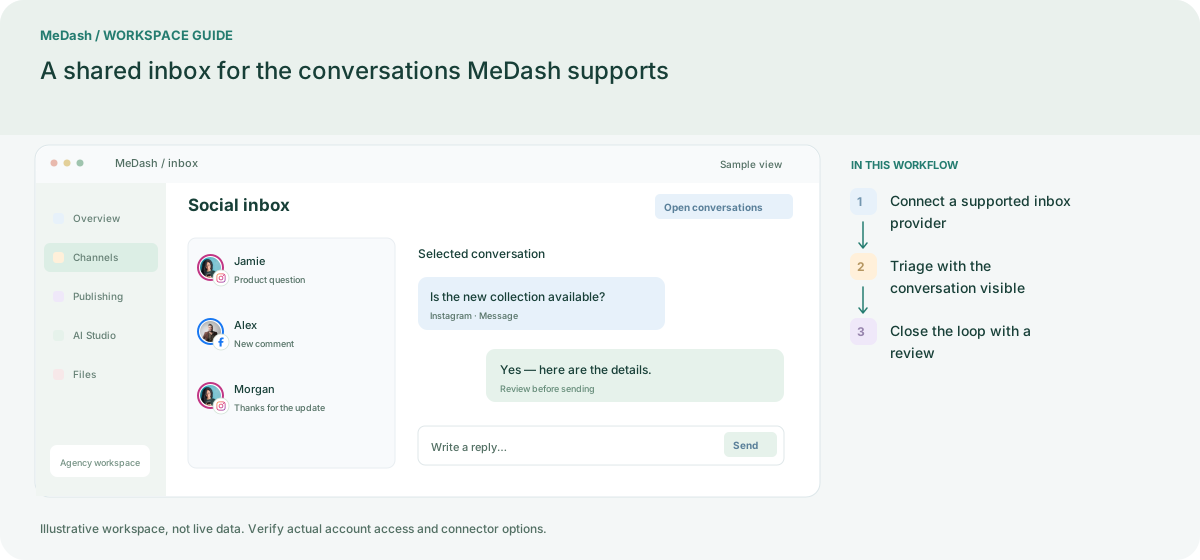
Connect a supported inbox provider
Choose Facebook messages or comments, Instagram messages or comments, or YouTube comments where the provider and account permit access. Check each inbox authorization separately from publishing.
Triage with the conversation visible
Open the conversation and its available post context before responding. Use the assignee, status and tags available in the workspace to keep ownership clear for the next team member.
Close the loop with a review
Verify the reply and current state, then mark the conversation appropriately. Keep personal account credentials out of handoffs. Provider permissions and API rules determine which actions are available.
What to check in this workspace
Review the thread and relevant published content before responding. Use the workspace’s existing permissions to share access. Do not describe this as an all-network inbox or promise unavailable TikTok, Pinterest or X message endpoints.
A support handoff after a launch
A campaign generates comments and messages on supported endpoints. The operator checks the selected inbox, reads the conversation history and verifies product details before replying. Unsupported destinations remain in their native applications.
Separate preparation and workspace handoffs
| Task | Separate preparation | MeDash |
|---|---|---|
| Conversation triage | Switch provider tabs and lose the context of unresolved messages. | Review conversations offered by the enabled inbox connectors in one workspace. |
| Reply verification | Assume publishing authorization also grants messaging access. | Verify the inbox endpoint, permissions and reply result separately. |
Completion checklist
- Review conversations offered by the enabled inbox connectors in one workspace.
- Verify the inbox endpoint, permissions and reply result separately.