


Grant the bot channel access
Use the enabled Telegram connection method and check the bot or connected identity has the required rights in the destination channel. Verify the destination identifier rather than relying on a display name alone.
Prepare timely updates for a selected Telegram channel or group. A short message, clear link and reusable image can be organized alongside the wider content calendar.
Compare plans ↗
Enabled account types: Telegram Channel · Telegram Group
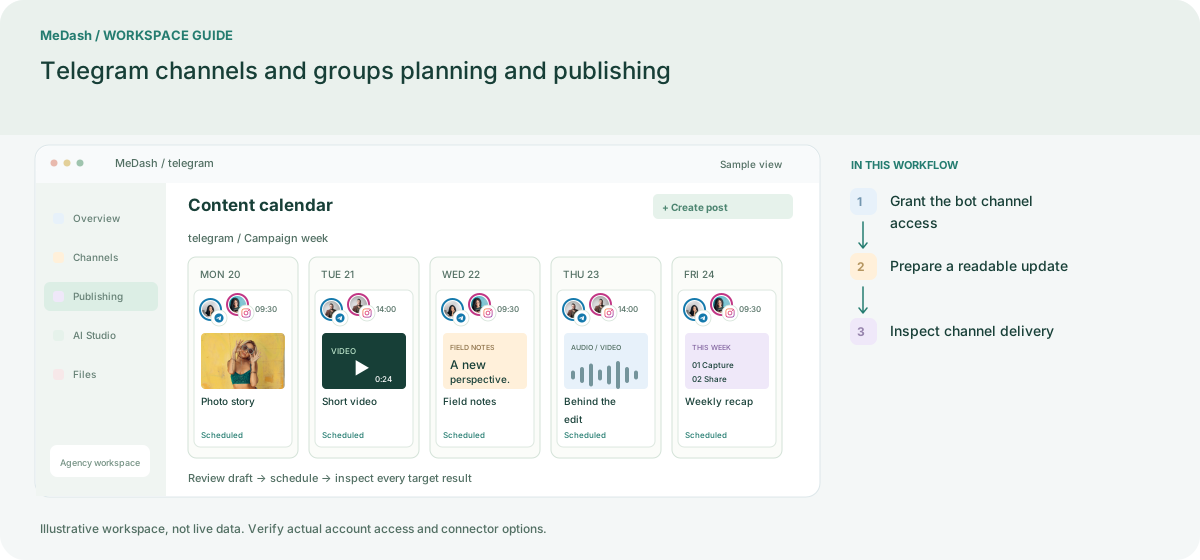
Use the enabled Telegram connection method and check the bot or connected identity has the required rights in the destination channel. Verify the destination identifier rather than relying on a display name alone.
Group a short introduction, destination link and compatible media in the draft. Review text formatting in a small test before reusing a template for recurring announcements.
Schedule with an explicit time zone, inspect the target result and open the channel if the result is uncertain. Reuse approved announcement structure while refreshing dates and offer details.
Channel distribution is distinct from a customer-service inbox. Review the target-level delivery outcome and avoid resending an unconfirmed message without checking.
Reuse an approved structure for new announcements while refreshing dates, links and the target channel.
An operating example, not a customer case study or a performance promise.
| Task | Separate preparation | With MeDash |
|---|---|---|
| Destination access | Rely on a similar channel display name when forwarding a notice. | Check the channel identity and connected bot permissions before scheduling. |
| Recurring bulletins | Copy last week’s announcement and overlook its dates. | Prepare a reviewed draft and verify dates and links before reusing the structure. |
The bot or connected identity must have the required rights in the specific destination channel. Recheck the channel identifier and permissions.
Review connected accounts, team seats, monthly publishing volume, storage and included credits. Feature availability follows your plan and workspace permissions.
Choose by your account count and publishing needs.
For solo creators and small brands starting with consistent Facebook and Instagram publishing.
Monthly payment
Annual payment, paid upfront
One payment covers 12 months. Equivalent to $10.00 per month.
Annual limits differ from monthly limits. Review the annual allowance below.
Choose by your account count and publishing needs.
For teams running recurring campaigns, queues, bulk publishing, and smarter content workflows.
Monthly payment
Annual payment, paid upfront
One payment covers 12 months. Equivalent to $30.00 per month.
Annual limits differ from monthly limits. Review the annual allowance below.
Choose by your account count and publishing needs.
For agencies and high-volume operators managing multiple brands, workspaces, and publishing pipelines.
Monthly payment
Annual payment, paid upfront
One payment covers 12 months. Equivalent to $65.83 per month.
Annual limits differ from monthly limits. Review the annual allowance below.
Network capabilities depend on account type, permissions and platform APIs. AI and paid API usage consume credits. Renewal, taxes and payment terms are shown at checkout.