


Telegram channels and groups planning and publishing
Telegram channels and groups planning and publishing: Check the channel identity and connected bot permissions before scheduling.; Prepare a reviewed draft and verify dates and links before reusing the structure.. Includes a review example.
Telegram channels and groups planning and publishing: practical steps, handoffs and completion checks.
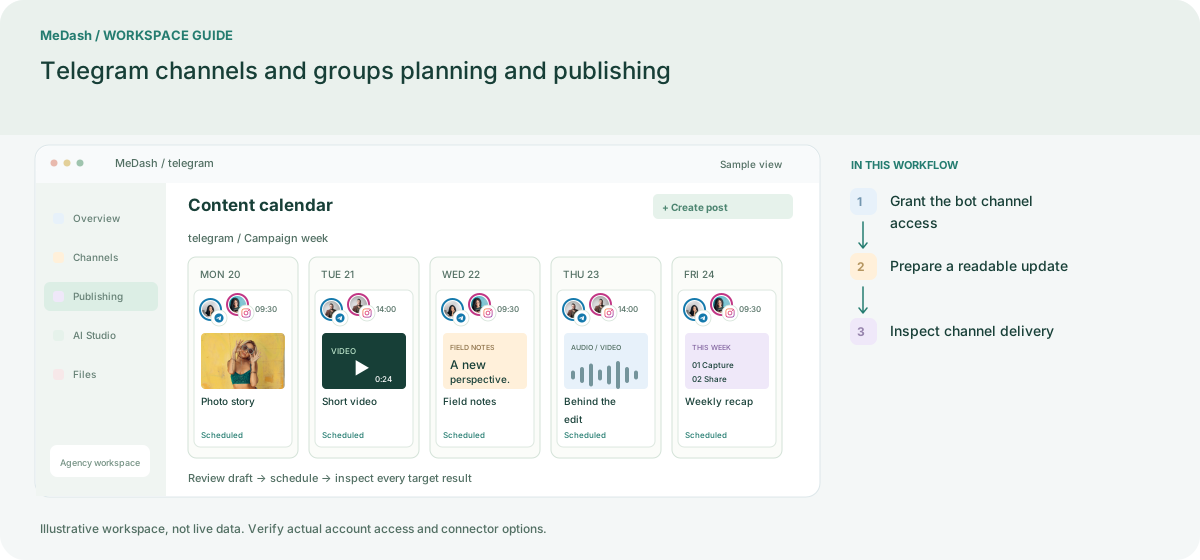
Grant the bot channel access
Use the enabled Telegram connection method and check the bot or connected identity has the required rights in the destination channel. Verify the destination identifier rather than relying on a display name alone.
Prepare a readable update
Group a short introduction, destination link and compatible media in the draft. Review text formatting in a small test before reusing a template for recurring announcements.
Inspect channel delivery
Schedule with an explicit time zone, inspect the target result and open the channel if the result is uncertain. Reuse approved announcement structure while refreshing dates and offer details.
What to check in this workspace
Channel distribution is distinct from a customer-service inbox. Review the target-level delivery outcome and avoid resending an unconfirmed message without checking.
A recurring community bulletin
Reuse an approved structure for new announcements while refreshing dates, links and the target channel.
Separate preparation and workspace handoffs
| Task | Separate preparation | MeDash |
|---|---|---|
| Destination access | Rely on a similar channel display name when forwarding a notice. | Check the channel identity and connected bot permissions before scheduling. |
| Recurring bulletins | Copy last week’s announcement and overlook its dates. | Prepare a reviewed draft and verify dates and links before reusing the structure. |
Completion checklist
- Check the channel identity and connected bot permissions before scheduling.
- Prepare a reviewed draft and verify dates and links before reusing the structure.