


Pinterest boards planning and publishing
Pinterest boards planning and publishing: Prepare the Pin with the connected account and intended board.; Build consistent UTM links with the free tool, then use them in the draft.. Includes a review example.
Pinterest boards planning and publishing: practical steps, handoffs and completion checks.
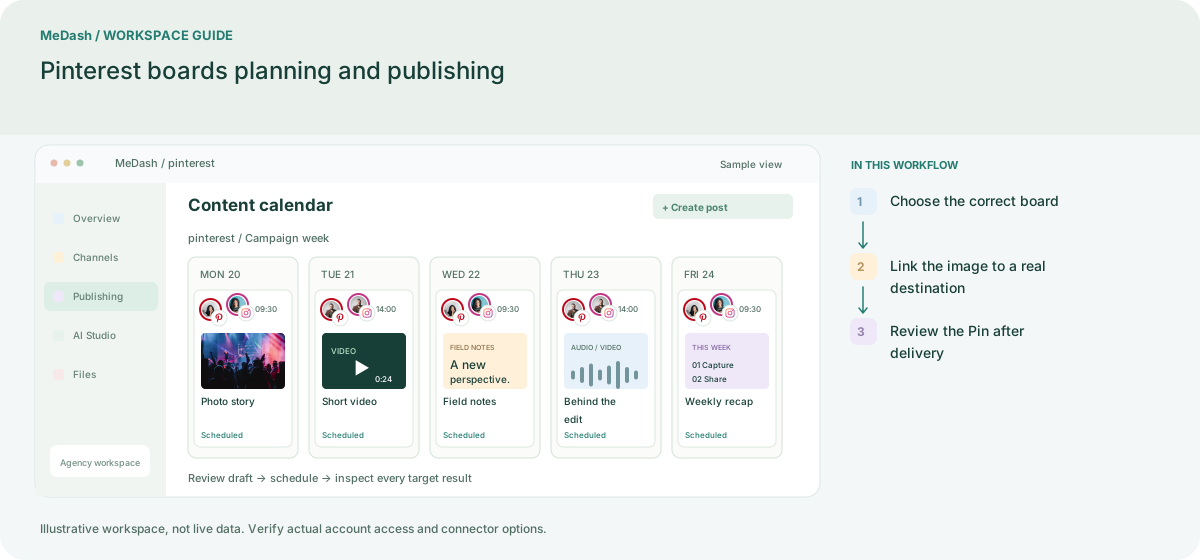
Choose the correct board
Connect the Pinterest account and verify the destination board. Keep the account and board together in the campaign checklist so a product Pin reaches the intended collection.
Link the image to a real destination
Prepare the Pin title, description, image and landing-page link. Check product availability and use consistent UTM tags when comparing organic traffic from several boards or creatives.
Review the Pin after delivery
Inspect the delivery record and verify the Pin destination. MeDash can organize publishing; store revenue and conversion attribution still depend on your commerce and analytics configuration.
What to check in this workspace
For commerce campaigns, keep the Pin’s promise aligned with its landing page and use UTM source and campaign values consistently. This does not replace sales attribution.
A seasonal product collection
Organize owned product images by board and distinguish creative variants with documented campaign links.
Separate preparation and workspace handoffs
| Task | Separate preparation | MeDash |
|---|---|---|
| Board mapping | List images in a folder with no destination-board reference. | Prepare the Pin with the connected account and intended board. |
| Traffic labels | Use inconsistent campaign names across product links. | Build consistent UTM links with the free tool, then use them in the draft. |
Completion checklist
- Prepare the Pin with the connected account and intended board.
- Build consistent UTM links with the free tool, then use them in the draft.