


Mastodon profiles planning and publishing
Mastodon profiles planning and publishing: Keep the connected instance and identity together.; Validate content against the actual connected instance.. Includes a review example.
Mastodon profiles planning and publishing: practical steps, handoffs and completion checks.
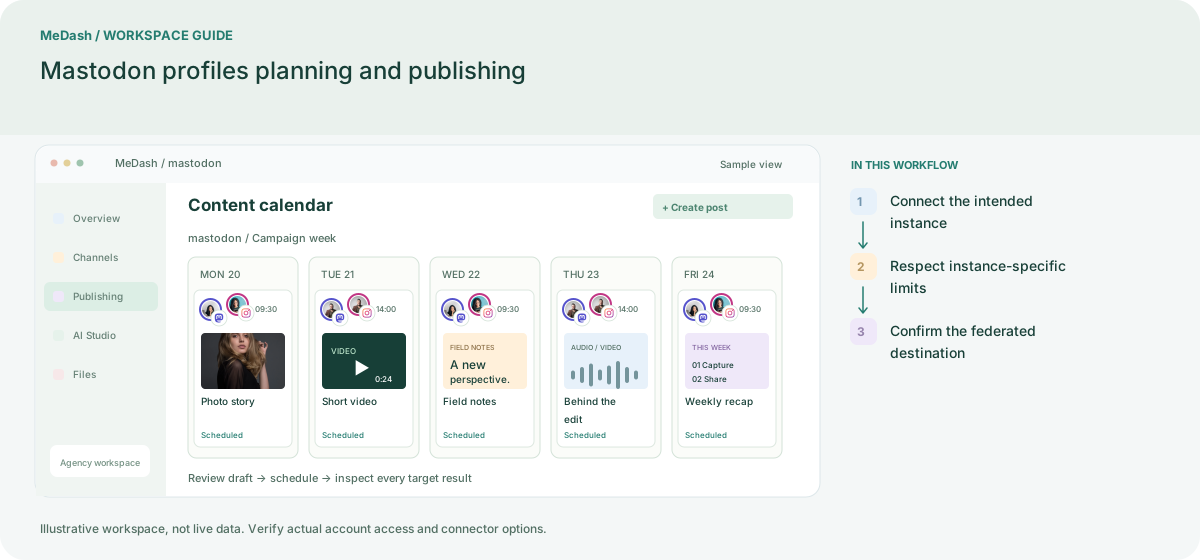
Connect the intended instance
Enter the Mastodon server used by your account and complete its authorization flow. Verify both the account name and instance; the same local name can exist on different servers.
Respect instance-specific limits
Prepare the status and media, then check the connected instance rules and the composer validation. Do not use a fixed character assumption for every server.
Confirm the federated destination
Inspect delivery on the selected instance. Report the account, instance and observation period together when comparing posts, because visibility and metric availability can differ.
What to check in this workspace
Confirm the selected instance and supported format before publishing. Interpret remote activity using the metrics actually returned by that connector.
An instance-aware community update
Publish to the authorized account on the intended instance and keep local rules with the draft checklist.
Separate preparation and workspace handoffs
| Task | Separate preparation | MeDash |
|---|---|---|
| Instance identity | Identify an account only by its local username. | Keep the connected instance and identity together. |
| Length and media | Apply one server’s rules to every Mastodon destination. | Validate content against the actual connected instance. |
Completion checklist
- Keep the connected instance and identity together.
- Validate content against the actual connected instance.