


Instagram account connections planning and publishing
Instagram account connections planning and publishing: Reuse Files assets with the target-specific caption in one draft.; Check the format options of the selected official or direct-login connector.. Includes a review example.
Instagram account connections planning and publishing: practical steps, handoffs and completion checks.
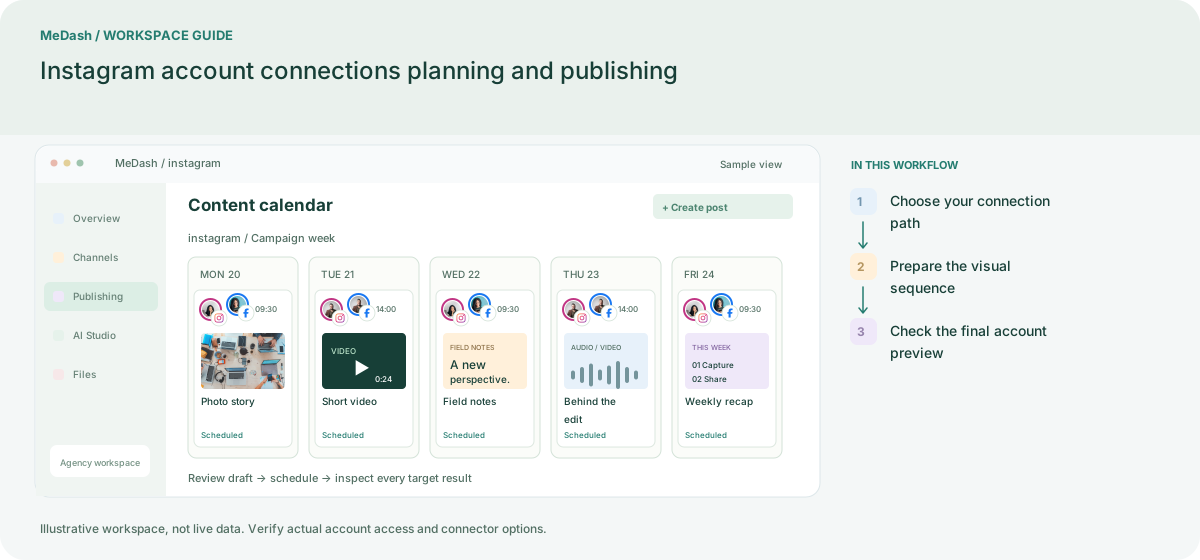
Choose your connection path
Check whether the workspace uses the official professional-account connector or an enabled direct-login connector. Select the intended business identity; the media options and permissions follow that connection path.
Prepare the visual sequence
Organize cover images, caption variants and the campaign link before composing. In the direct-login implementation, Reels uses one video and Stories one image; do not assume mixed-video carousels are accepted.
Check the final account preview
Verify the account, format and caption together, then send the draft for review where required. After scheduling, inspect that target result. Inbox access is a separate permission from publishing access.
What to check in this workspace
In the direct-login implementation, Reels requires one video, Stories one image, and mixed-video carousels are rejected. Instagram inbox permissions are managed separately.
A weekly visual series
A creator groups approved images and a short video around one theme, then prepares the formats accepted by the selected connector.
Separate preparation and workspace handoffs
| Task | Separate preparation | MeDash |
|---|---|---|
| Asset handoff | Pass cover files and caption versions between folders and chats. | Reuse Files assets with the target-specific caption in one draft. |
| Format selection | Assume every account connection accepts the same Reel or Story. | Check the format options of the selected official or direct-login connector. |
Completion checklist
- Reuse Files assets with the target-specific caption in one draft.
- Check the format options of the selected official or direct-login connector.