


Facebook Pages planning and publishing
Facebook Pages planning and publishing: Select authorized Page destinations alongside the content draft.; Organize drafts, campaign labels and scheduled destinations in the publishing workspace.; Inspect each target record, then check the Page when an outcome needs confirmation.. Includes a review example.
Facebook Pages planning and publishing: practical steps, handoffs and completion checks.
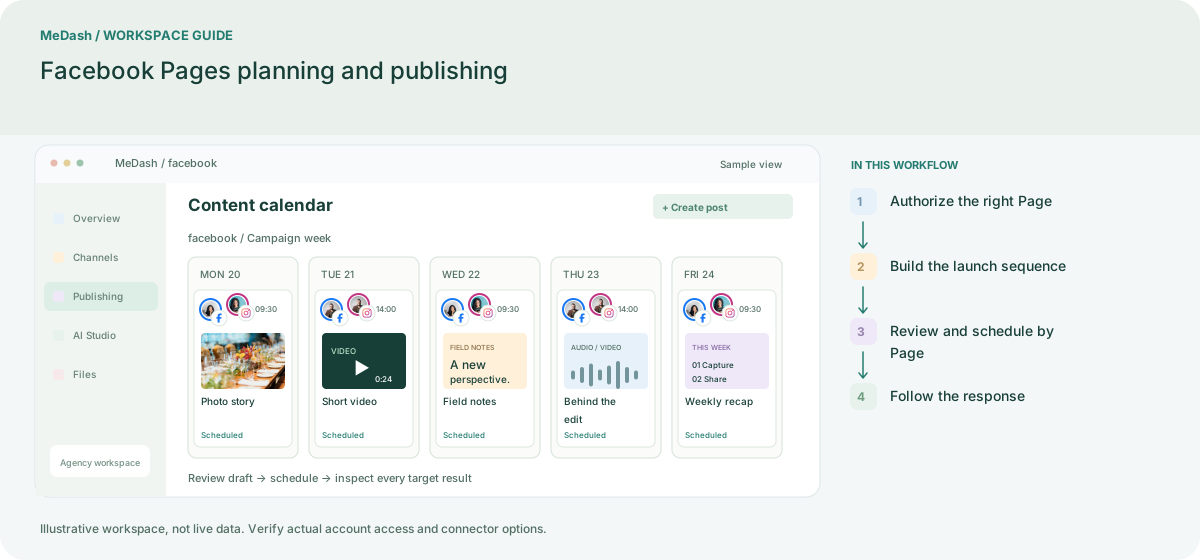
Authorize the right Page
Open Channels, choose Facebook Pages and select the Page your team manages. Confirm the Page name before leaving authorization. Reconnect when access changes; a personal profile is not the publishing destination.
Build the launch sequence
Create separate announcement, explanation and reminder drafts. Attach owned images or video, check the destination URL, and keep the campaign label consistent. Review the format accepted by the selected Facebook connector.
Review and schedule by Page
Have the permitted reviewer confirm product details, offer dates and media rights. Schedule using the workspace time zone. A multi-Page campaign should retain a separate result for every selected destination.
Follow the response
Inspect delivery records before opening available Page analytics. Handle supported comments or Messenger conversations through the separate inbox connector. Use the response to choose the next content topic, rather than treating scheduled status as proof of publication.
What to check in this workspace
Local businesses can schedule opening-hour updates, agencies can keep client approvals visible, and brands can compare launch posts across Pages. Keep claims, dates and destination links accurate; MeDash organizes delivery but does not invent Page insights or commerce attribution.
A local launch across two Pages
A brand owner prepares an announcement and a reminder, while a reviewer checks the offer dates. Both Pages share approved media but retain separate destinations and delivery records.
Separate preparation and workspace handoffs
| Task | Separate preparation | MeDash |
|---|---|---|
| Page identity | Switch browser profiles and recheck the selected Page for each draft. | Select authorized Page destinations alongside the content draft. |
| Launch sequence | Keep announcement dates in a sheet and media approvals in messages. | Organize drafts, campaign labels and scheduled destinations in the publishing workspace. |
| Delivery follow-up | Open every Page separately to find the published item. | Inspect each target record, then check the Page when an outcome needs confirmation. |
Completion checklist
- Select authorized Page destinations alongside the content draft.
- Organize drafts, campaign labels and scheduled destinations in the publishing workspace.
- Inspect each target record, then check the Page when an outcome needs confirmation.