


A campaign workflow for brand marketing teams
A campaign workflow for brand marketing teams: Reuse approved Files assets in campaign-tagged drafts.; Inspect delivery first, then compare available results within the same scope.. Includes a review example.
A campaign workflow for brand marketing teams: practical steps, handoffs and completion checks.
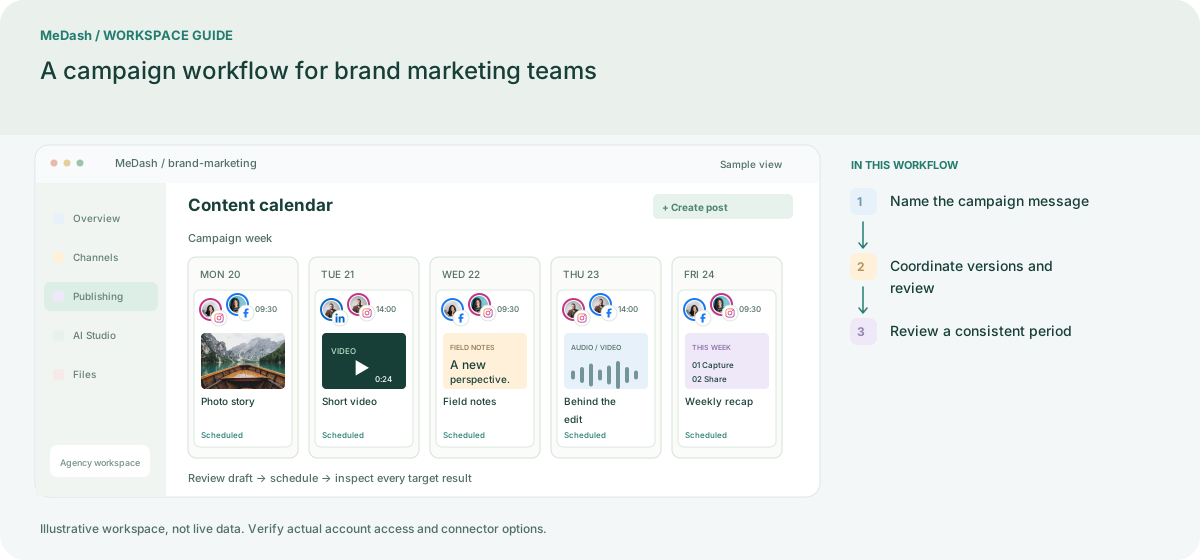
Name the campaign message
Write the offer, audience and destination page once, then decide which enabled accounts need a different angle. Keep source facts and a campaign label with every draft to preserve brand context.
Coordinate versions and review
Prepare a small group of channel-specific posts using approved media. Let the reviewer check claims, dates and links before assigning publishing times across the campaign calendar.
Review a consistent period
Compare delivery and the available metrics for the same reporting window. Use one concrete learning for the next campaign; social reactions alone cannot establish business revenue.
What to check in this workspace
For an awareness launch, review available impressions or reach; for a landing-page campaign, keep UTM naming consistent and consult the destination analytics. Avoid combining unlike metrics into one unexplained score.
A consistent seasonal launch
A brand assembles approved imagery and verified product details, then adapts the launch story for the connected networks. Campaign labels keep the sequence identifiable, while account-level results guide the next creative decision.
Separate preparation and workspace handoffs
| Task | Separate preparation | MeDash |
|---|---|---|
| Brand consistency | Collect captions and approved assets from separate conversations. | Reuse approved Files assets in campaign-tagged drafts. |
| Launch review | Combine unrelated periods and account types in one summary. | Inspect delivery first, then compare available results within the same scope. |
Completion checklist
- Reuse approved Files assets in campaign-tagged drafts.
- Inspect delivery first, then compare available results within the same scope.